
The Problem
Read-it-later apps are either cloud-locked, behind a paywall, or both. Pocket, Instapaper, and their equivalents store your articles on their servers, require accounts, and offer text-to-speech only on paid tiers — and even then it sounds robotic and unnatural.
If you want to save an article and listen to it on your commute, you’re paying someone else to own your reading list and your audio.
Most read-it-later apps treat TTS as a premium upsell. But the models to do it locally have been available for years — they just weren’t packaged accessibly.
The gap was clear: a clean, private, local-first app that could extract articles from the web and generate natural-sounding audio without touching a single external API.
The Solution
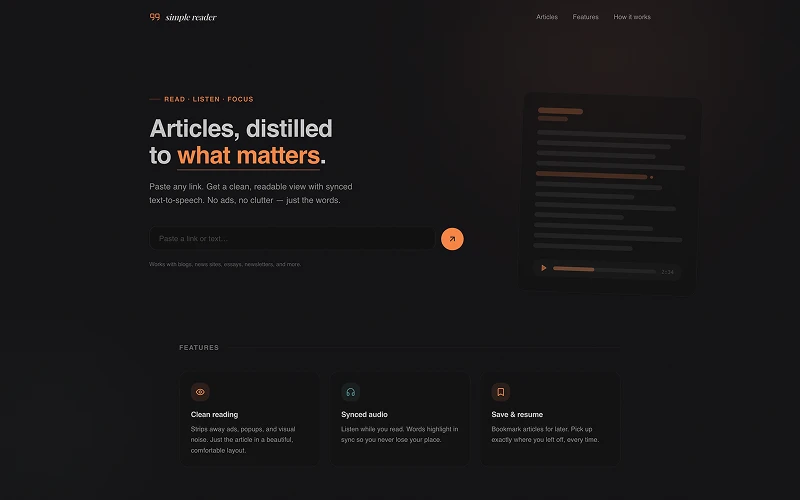
Simple Reader runs entirely on your machine. One docker compose up starts the Next.js app, PostgreSQL, and the TTS service together. No accounts. No API keys. No data leaving your network.
Article extraction uses Mozilla Readability — the same library Firefox Reader View uses — to strip away ads, popups, and navigation and return just the content. The app also handles paywall detection and removes cookie banners before parsing, so you get clean text even from noisy pages.
Text-to-speech is powered by Kokoro-82M, a small ONNX model (~92MB) that auto-downloads on first use and runs via a Node.js child process. It produces natural-sounding speech with sentence-level alignment so the reader can highlight each sentence as it plays.
Running It
docker compose up -d --buildOpen localhost:3000. PostgreSQL, the Next.js app, and TTS all start from this single command.
Development mode
cp .env.example .env
docker compose up -d postgres       # start just the database
pnpm install
pnpm prisma generate
pnpm prisma migrate deploy
pnpm dev
How It Works
- User submits a URL or pastes text directly
- URLs are fetched, cleaned (popup removal, paywall detection), and parsed with Readability
- Content is split into typed sections — paragraphs, headings, code blocks, tables, lists, images, videos, blockquotes
- Sections are stored as JSON in PostgreSQL
- TTS spawns a Node.js child process running Kokoro-82M locally — the ONNX model auto-downloads on first use
- Audio is saved as WAV and served statically with sentence-level alignment for highlighted playback
Tech Stack
| Layer | Tech |
|---|---|
| Framework | Next.js (App Router), React 19, TypeScript |
| Styling | Tailwind v4, shadcn/ui |
| Database | PostgreSQL 16, Prisma |
| Article extraction | Mozilla Readability, JSDOM |
| Text-to-Speech | Kokoro-82M via kokoro-js + onnxruntime-node |
| Code highlighting | Shiki |
| Deployment | Docker Compose |
TTS Configuration
All TTS options are environment variables — set them in .env or pass them to Docker:
| Variable | Default | Description |
|---|---|---|
KOKORO_VOICE | af_heart | Voice name |
KOKORO_SPEED | 1 | Speech speed multiplier |
KOKORO_DTYPE | q8 | Model precision (q8 = quantized, faster) |
Key Decisions
Why Kokoro-82M instead of a cloud TTS API? Cloud APIs are fast and easy to integrate but they require API keys, send your text to a third-party server, and cost money at scale. Kokoro-82M is small enough to ship in Docker and produces output that is genuinely good — not the robotic quality you get from older local models. The ~92MB download happens once and is cached.
Why store content as typed sections instead of raw HTML? Raw HTML is fragile to render and hard to align TTS to. Splitting content into typed sections (paragraph, heading, code, etc.) gives the frontend a clean data model to render and lets the TTS pipeline operate on discrete text units, which is exactly what’s needed for sentence-level playback alignment.
Why Docker Compose with three services? PostgreSQL and the TTS service have different resource profiles and lifecycle needs from the Next.js app. Separating them makes it straightforward to scale or replace any one piece — and the single docker compose up command keeps the local setup to one line.
Why JSDOM + Readability instead of a scraping API? Scraping APIs add latency, cost, and a network dependency. Running Readability locally is faster, keeps all content on-device, and means the app works on any URL without rate limits or third-party outages.
Outcome
A fully local read-it-later app that works offline once the model is downloaded. Articles are saved, readable, and listenable without any external dependency after the initial setup.
The project reinforced something I keep finding true: the hardest part of local-first software is packaging, not the algorithms. Kokoro-82M has been available for a while. The work was in wiring it into a Docker service, handling the ONNX runtime, and making the sentence alignment feel natural in the UI.